
Introduction
If you’re tired of juggling 10 different tools — one for emails, another for SMS, another for CRM, another for landing pages — there’s a better way.
Go High Level is an all-in-one platform that combines CRM, marketing automation, funnel building, and client management — all in one place.
And after helping dozens of businesses in South Florida implement it, I can tell you this:
It’s not just a tool.
It’s a game-changer.
Whether you’re a coach, consultant, contractor, or agency owner, Go High Level for marketing automation can help you:
Capture leads from any source
Nurture them automatically
Book appointments without lifting a finger
Close more deals — consistently
In this guide, I’ll walk you through how to use Go High Level effectively, step by step, so you can start automating your business today.
Why Go High Level Is the Best Choice for Small Businesses
Before we dive in, let’s be clear:
There are many CRM and automation tools out there.
But Go High Level stands out because it’s built for service-based businesses that need more than just email marketing.
Here’s why it’s perfect for entrepreneurs in Miami, Fort Lauderdale, and beyond:
✅ All-in-One Platform – No more switching between Mailchimp, Calendly, and HubSpot.
✅ Built-in CRM – Tracks every lead from first touch to closed deal.
✅ Automation That Works – Email, SMS, calls, and tasks triggered by behavior.
✅ Landing Pages & Funnels – Create high-converting pages without coding.
✅ Calendar & Appointment Booking – Syncs with Google Calendar and sends reminders.
✅ White-Label Option – Rebrand it as your own (ideal for agencies).
✅ Affordable Pricing – Starts at $97/month with unlimited contacts and users.
It’s like ClickFunnels + HubSpot + ActiveCampaign — but designed for real-world service businesses.
The 6 Core Features of Go High Level You Need to Master
To get the most out of Go High Level, focus on these six key features:
1. CRM & Contact Management
Every lead — from Facebook Ads, your website, or a referral — goes into a centralized database.
You can:
Tag contacts by service interest (e.g., “AC Repair”, “Roof Inspection”)
Track their behavior (emails opened, links clicked)
Assign them to team members
Set follow-up tasks
This eliminates chaos and ensures no lead falls through the cracks.
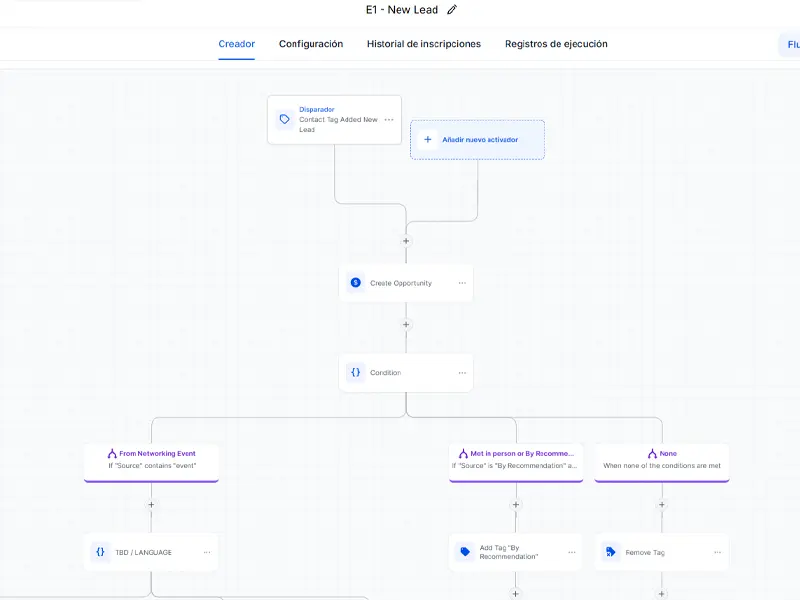
2. Automation Builder (Workflows)
This is where the magic happens.
With the visual workflow builder, you can create automated sequences like:
Welcome Sequence:
Lead submits form → Gets SMS: “Thanks! Here’s your free guide” → 1 hour later: “Want to book a free inspection?”
Follow-Up Sequence:
Lead doesn’t reply → Day 2: Email with testimonial → Day 4: SMS with limited-time offer.
Post-Service Sequence:
Job completed → Email: “How was your experience?” → If positive: “Refer a friend and get $50”
You can trigger workflows based on:
Form submissions
Link clicks
Tags
Date/time
Missed calls or appointments
3. Landing Pages & Funnels
Go High Level lets you create high-converting landing pages in minutes — no coding needed.
Use them for:
Free consultations
Downloadable guides
Service promotions
Webinar signups
And best of all:
Every lead captured goes directly into your CRM — no manual export/import.
4. Email & SMS Marketing
Send personalized messages at scale.
Features:
Drag-and-drop email editor
SMS automation (with 2-way messaging)
Dynamic fields (e.g., “Hi {{first_name}}”)
A/B testing for subject lines
💡 Pro Tip: Combine SMS + Email for 3x higher response rates.
5. Appointment Booking & Calendar Sync
Let clients book directly into your calendar — 24/7.
You can:
Set availability rules (e.g., only weekdays, 9 AM–5 PM)
Add buffer time between appointments
Send automated reminders (email + SMS)
Reschedule or cancel with one click
And when someone books, it triggers a follow-up workflow automatically.
6. Reporting & Analytics
See what’s working — and what’s not.
Key reports:
Pipeline Overview: How many leads are in each stage
Automation Performance: Open rates, click rates, conversions
Revenue Tracking: Closed deals and average ticket size
Team Productivity: Tasks completed, calls made
This data helps you refine your strategy and scale with confidence.
How to Set Up Go High Level in 5 Steps
You don’t need to be a tech expert. Here’s how to get started:
Step 1: Sign Up & Connect Your Domain
Go to gohighlevel.com and sign up.
Connect your domain (e.g., yourbusiness.com) so your pages look professional.
Step 2: Build Your First Funnel
Create a simple funnel:
Lead Capture Page: “Free AC Inspection”
Thank You Page: “Your appointment is confirmed!”
Calendar Integration: Let them pick a time
Use a pre-built template to save time.
Step 3: Set Up Your CRM & Tags
Organize your contacts:
Create tags: “AC Repair”, “New Lead”, “Client”, “No Show”
Set up pipelines: “Lead → Contacted → Appointment Set → Closed”
This keeps everything organized.
Step 4: Create Your First Automation
Build a 3-day follow-up sequence:
Day 0: “Thanks for your interest! Here’s what to expect.”
Day 1: “Here’s a video of a recent job we did in Miami.”
Day 2: “Ready to book? Click here to schedule your free inspection.”
Use both email and SMS.
Step 5: Connect Your Ads & Social Media
Link your funnel to:
Facebook Lead Ads
Google Ads
Instagram bio link
Now every lead goes into your CRM automatically.
Real Example: How a Miami Contractor Scaled with Go High Level
A home remodeling contractor was getting 20 leads/month but closing only 3.
We set up Go High Level with:
- A “Free Home Evaluation” landing page
- SMS + email follow-up sequence
- Automated calendar booking
- CRM pipeline to track progress
Results in 8 weeks:
- 📈 Leads increased to 60/month
- 📞 Appointments booked: 25+ per month
- 💬 Response rate: 78% (up from 22%)
- 📊 Close rate: 40% (up from 15%)
All without hiring a sales team.
Common Go High-Level Mistakes (And How to Avoid Them)
❌ Overcomplicating Workflows
Too many branches and delays slow things down.
✅ Fix: Start simple. Use 3–5-step sequences.
❌ Ignoring SMS
Email alone has low open rates. SMS gets a 98% open rate.
✅ Fix: Always include SMS in your sequences.
❌ Not Using Tags
Without tags, you can’t segment or personalize.
✅ Fix: Tag every lead based on interest and behavior.
❌ Letting the CRM Go Unused
If you don’t update it, it becomes outdated.
✅ Fix: Make it a habit to review your CRM daily.
How Go High Level Fits Into Your Full Digital System
Go High Level isn’t just a tool — it’s the hub of your digital strategy.
It connects with:
- Website: Capture leads from contact forms
- Social Media: Drive traffic to your funnels
- Google & Meta Ads: Send ad leads directly to CRM
- Email Marketing: Nurture with personalized content
- Google My Business: Sync reviews and messages
This creates a closed-loop system where every interaction moves the client forward.
Conclusion: Automation Is the Future of Small Business
If you’re serious about growing your business without burning out, Go High Level for marketing automation is the answer.
It’s not about replacing the human touch.
It’s about freeing up your time so you can focus on what matters: serving your clients.
And in a competitive market like South Florida, that’s the only way to scale.
📣 Ready to Automate Your Business?
If you’re ready to stop chasing leads and start converting them automatically, I can help.
As a digital marketing advisor, I specialize in helping service businesses in South Florida implement Go High Level and build scalable systems.
👉 Schedule your free consultation today.
Let’s build your automated business together.
📲 +1 (954) 305-4001